Monday, August 15, 2011

Getting rid of the LOV timestamp

One of the famous problems in Designer is getting rid of the timestamp LOV and sorting the date LOV according to the date column.

Here is the step by step procees in order to achieve that in Oracle:

1.first we have the date object in the universe named :Time Key

2.Inside the object properties we can see the date LOV time stamp:


3.Now we will create an object that will be used inside the object's LOV,later on we re-map the lov of the date object to this object's LOV:
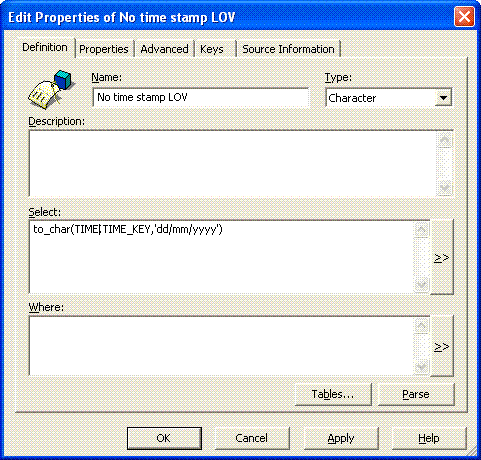


this object contain the function to_char in order to format the date object.

4.Inside the time key object properties we will re-map the LOV to the "No time stamp LOV " object and sort it from Z to A

 
5.Now we will get inside the object LOV and esit it's SQL to:

SELECT


to_char(TIME.TIME_KEY,'dd/mm/yyyy')
FROM
TIME
ORDER BY TIME.TIME_KEY


the result is :

 
make sure that you thick the "do not genertae" button  and the "export with universe" property of the LOV.

Sunday, August 14, 2011

Time difference calculations for call center - part 1

Here are two scripts that return the time difference between two dates in Oracle:

1.The following script returns the time portion in seperated columns :


SECOUNDS   MINUTES    HOURS    DAYS

     38              8            10           2569 


SELECT TO_CHAR(DATES.TIME_KEY, 'DD/MM/YYYY:HH24:MI:SS') AS TIME_KEY,

TO_CHAR(SYSDATE, 'DD/MM/YYYY:HH24:MI:SS') AS TODAY,
trunc(86400 * (SYSDATE - DATES.TIME_KEY)) -60 * (trunc((86400 * (SYSDATE - DATES.TIME_KEY) / 60))) AS SECOUNDS,trunc((86400 * (SYSDATE - DATES.TIME_KEY)) / 60) -60 *(trunc(((86400 * (SYSDATE - DATES.TIME_KEY)) / 60) / 60)) AS MINUTES,trunc(((86400 * (SYSDATE - DATES.TIME_KEY)) / 60) / 60) -24 *(trunc((((86400 * (SYSDATE - DATES.TIME_KEY)) / 60) / 60) / 24)) AS HOURS,trunc((((86400 * (SYSDATE - DATES.TIME_KEY)) / 60) / 60) / 24) AS DAYS

FROM DATES.TIME_KEY
 

2.The following script returns the time portion in hours,minutes and secounds in one column :

HOURS MINUTES SECOUNDS       
61 :    22 :    11
 
SELECT

TO_CHAR(DATES.TIME_KEY.TIME_KEY, 'DD/MM/YYYY:HH24:MI:SS') AS TIME_KEY,
TO_CHAR(SYSDATE, 'DD/MM/YYYY:HH24:MI:SS') AS TODAY,
(sysdate - nvl(DATES.TIME_KEY.TIME_KEY, sysdate)) * 24 as hour_diff,
floor((SYSDATE - DATES.TIME_KEY.TIME_KEY) * 24) ' : '
mod(floor((SYSDATE - DATES.TIME_KEY.TIME_KEY) * 24 * 60), 60)' : '
mod(floor((SYSDATE - DATES.TIME_KEY.TIME_KEY) * 24 * 60 * 60), 60)' ' time_difference

FROM DATES.TIME_KEY

These scripts can become universe objects and are good for call center calculation

SAP BusinessObjects BI 4.0 Platform Demo

 sneak preview demo of SAP BusinessObjects 4.0 new capabilities in Designer and Webi modules:

Dashboards in SAP BusinessObjects 4.0

Watch this demo of the new Xceslius called SAP Dashboard in version 4.0
 including some new great features like:
direct binding,embedded query designer,parameter selector component


Wednesday, August 10, 2011

YTD and MTD Prompts

Here are code samples for creating YTD and MTD prompts in the universe designer,the prompts are written for Oracle :

1. YTD
This prompt allows the user to enter a date and get all the dates from the month of the chosen date till the beginning of the current month, for example:

If the user will type 05/05/2010 (mm/dd/yyyy) he will get the range: 05/01/2010 till the first day of the current month.

Code:

Table.date BETWEEN trunc(To_Date(@Prompt('Enter Date:','D',,Mono,Free),'mm/dd/yyyy hh24:mi:ss'),'mm') AND TRUNC(SYSDATE,'MM')

2. YTD specific year:

This prompt allows the user to enter a date and get all the dates from the first day of the year of the chosen date till the chosen date, for example:

If the user will type 05/05/2011 (mm/dd/yyyy) he will get the range: 01/01/2011 till 05/05/2011.

Code:

Table.date between trunc(to_date(substr(@Prompt('Pick date','D','folder\date_object',mono,free),1,10),'mm/dd/YYYY'), 'YEAR') and to_date(substr(@Prompt('Pick target date','D','folder\date_object',mono,free),1,10),'mm/dd/YYYY')

3.MTD

This prompt allows the user to enter a date and get all the dates from the first day of the month of the chosen date till the chosen date, for example:

If the user will type 05/05/2011 (mm/dd/yyyy) he will get the range: 05/01/2011 till 05/05/2011.

Code:

trunc(Table.date) BETWEEN trunc(to_date(@Prompt('Enter Date:','A',,mono,free),'DD/MM/RR'),'MM')

AND to_date(@Prompt('Enter Date:','A',,mono,free),'DD/MM/RR

Sunday, August 7, 2011

Sunday, July 31, 2011

On Data Minning ,your unknown grandmother and information monsters

A very interesting article i came across today :

It is an interview with Shumeet Baluja ,a Senior Staff Research Scientist at Google, speaking about data minning,information research and getting information on people who aren't even a part of your structured data:

SAP will integrate Google Maps

SAP will cooperate with Google Maps,after Centigon has already integrated Google Maps in Xcelsius,
now comes SAP  turn to targer to one of the hottest areas of BI -Data Visualization in a geographic context/
read here the original article that was published by SAP 

Tuesday, July 5, 2011

Who moved my universe ?

One of the most unpleasant symptoms that can happen to a busy BI team are universe overrides by different designers.In general , universe overrides shouldn't happen and by determining simple working processes, keeping the team synchronized and updated and making sure that the universe life cycle is secured we should get a healthy environment . But what happens when someone exports the universe to production against the regulation?

As the team manger, finding out who exported the universe last can help you improve the change management and simply know who was the last person that updated the universe which can be a very important information. This information can be pulled out from the Activity universe and by crossing this information with the CMC, you can know for sure.

The following query is based on the Activity universe (Oracle based) and will pull out all the changes that were made in a particular universe in a specific date.  

Please note:   The changes are not necessarily describing export actions of the universe and therefore i recommend to Identify the last record of the export by looking in the CMC, under universes, you can find a column next to The name of the universe that shows the last update date, this date will also appear in the report and by crossing these records you will get the correct answer to "who exported the universe last?"  

Here is the query script:

 Table__37.DETAIL_TEXT,   AUDIT_EVENT.User_Name, AUDIT_EVENT.Start_Timestamp +( (3/24) )FROMAUDIT_EVENT,( SELECTAUDIT_DETAIL.Detail_Text,AUDIT_EVENT.Event_ID FROMAUDIT_DETAIL,AUDIT_EVENTWHEREAUDIT_DETAIL.Event_ID=AUDIT_EVENT.Event_ID AND AUDIT_EVENT.Event_Type_ID = 65544) Table__37WHERE( Table__37.EVENT_ID=AUDIT_EVENT.Event_ID )AND (( ( Table__37.DETAIL_TEXT ) LIKE '%' @Variable('enter teh universe name or part of the universe name ') '%' )AND Table__37.DETAIL_TEXT NOT LIKE '%Everyone%'AND Table__37.DETAIL_TEXT NOT LIKE '%/%'AND ( ( trunc(AUDIT_EVENT.Start_Timestamp) ) BETWEEN @Prompt('from action date','A','Action Time\Action Date',mono,free)AND @Prompt(' till action date','A','Action Time\Action Date',mono,free) ))

Wednesday, June 15, 2011

How will Designer look like in the next version ?

Version BI4 is officially out and among all articles and presentations that you can find online here is a very good one written by Joshua Fletcher, who presents the new Designer capabilities: