Microsoft and SAP announced the general availability of Power BI connectivity to SAP BusinessObjects BI. This joint business intelligence interoperability solution is delivered in Microsoft Excel, Power BI for Office 365, and SAP BusinessObjects BI. With this solution, users can....click here for further reading...
Tuesday, June 10, 2014


Tuesday, March 18, 2014
SAP BusinessObjects Reporting Cookbook coming up
Hi All,
Been very busy in the last months writing the SAP BusinessObjects Reporting Cookbook for packet publishing an A-Z guide that will walk you through the entire Web Intelligence environement,the book isn't yet ready and would be in the stores in October 2014 but you can already get the preview or the RAW version of it ,enjoy..more updates will come soon
Wednesday, September 11, 2013
Creating default value in a dynamic date range prompt
One of the most requested features in Web Intelligence reports is to have a default value in a time range prompt that will enable to chose time frames such as current day, last day and ctr.
In the following example I will demonstrate how to implement such logic in a very simple way
I am using:
- BI4 SP6
- Oracle 11
- A Custom Universe containing a time view table
- Information design tool
- First we will create s special super prompt condition object that will enable us to choose date range ,current month or last month :

This script uses a case when phrase that allows choosing
several time ranges.
For example ‘this month’ will return
the function: TRUNC(SYSDATE,'MM') which will result us the current month data

Here is the full syntax:
"GenericDateTable".GENERICCURRENTDATE between
Case
WHEN @Prompt('From
Date(dd/mm/yyyy)','A',,Mono,Free,Not_Persistent)='last month' then
trunc(add_months(last_day(sysdate),-2)) + 1
WHEN @Prompt('From
Date(dd/mm/yyyy)','A',,Mono,Free,Not_Persistent)='this month' then TRUNC(SYSDATE,'MM')
Else To_Date(@Prompt('From
Date(dd/mm/yyyy)','A',,Mono,Free,Not_Persistent),'DD/MM/YYYY')
End
AND
Case when @Prompt('To Date
(dd/mm/yyyy)','A',,Mono,Free,Not_Persistent) = 'last month' THEN trunc(add_months(last_day(sysdate),-1))
WHEN @Prompt('From Date(dd/mm/yyyy)','A',,Mono,Free,Not_Persistent)='this
month' then ADD_MONTHS(TRUNC(SYSDATE,'MM'),+1)
Else
To_DATE(@Prompt('To Date
(dd/mm/yyyy)','A',,Mono,Free,Not_Persistent),'DD/MM/YYYY')
End
2. Now we will first test our prompt to varify that it is working currectly :
This month data :

month_data.png)


Date range :


that corresponed to our prompt ,lets use the value ‘last month’,the last parameter in the prompt is the one that holds the default value and as you can see when we open the report the default value is already there :

"GenericDateTable".GENERICCURRENTDATE between
Case WHEN @Prompt('From
Date(dd/mm/yyyy)','A',,mono,free,Not_Persistent,{'last month'})='last
month' then trunc(add_months(last_day(sysdate),-2)) + 1
WHEN @Prompt('From
Date(dd/mm/yyyy)','A',,mono,free,Not_Persistent,{'last month'})='this month'
then TRUNC(SYSDATE,'MM')
Else To_Date(@Prompt('From
Date(dd/mm/yyyy)','A',,mono,free,Not_Persistent,{'last month'}),'DD/MM/YYYY')
End
AND
Case when @Prompt('To Date
(dd/mm/yyyy)','A',,mono,free,Not_Persistent,{'last month'}) = 'last month'
THEN
trunc(add_months(last_day(sysdate),-1))
WHEN @Prompt('From
Date(dd/mm/yyyy)','A',,mono,free,Not_Persistent,{'last month'})='this month'
then ADD_MONTHS(TRUNC(SYSDATE,'MM'),+1)
Else To_DATE(@Prompt('To Date
(dd/mm/yyyy)','A',,mono,free,Not_Persistent,{'last month'}),'DD/MM/YYYY')
End
Now when we will run the report we will see the default value:
And that’s it….
Conclusion:
Implementing default dynamic time range is simple but can be
also used to reports that are required to run daily using date range but also
required to be scheduled on last month, by implementing such prompt we will
reduce the number of versions of the same report: one version for daily running
and the other version for scheduling…
Monday, July 8, 2013
 :

Monday, July 1, 2013


Wednesday, June 26, 2013
Monday, June 24, 2013
What is new in Mobile BI 5.0 ?
Read about all the new exiting chnages in the latest version of Mobile BI :
Monday, May 20, 2013
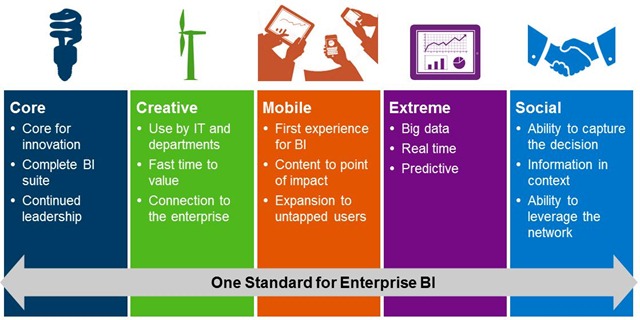
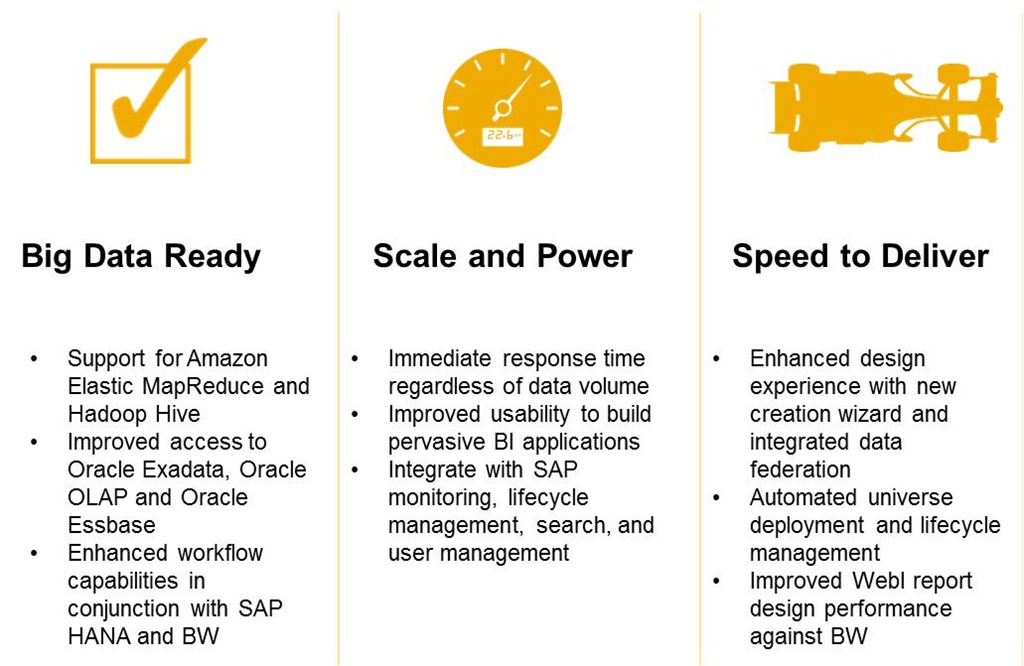
SAP BusinessObjects BI 4.1 Release to Customers
Just before the SAPPHIRE NOW conference, SAP announced the Release to Customer (RTC) of SAP BusinessObjects BI 4.1, Edge BI 4.1 and Crystal Server 2013.
Read here about all the new features in this version:
Wednesday, March 6, 2013
SAP Offers Small Businesses More Visibility and Control With Business Management Solution Running Fully on SAP HANA Platform
SAP today announced SAP Business One, version for SAP HANA, the first business management solution for SMEs running fully in memory:
Subscribe to:
Posts (Atom)