Monday, October 10, 2011

Impact Analysis in Auditor ?

Apparently you can get from the Auditor some Meta data information.

There are few drawbacks for this deal that makes the whole approach limited but for specific tests, general estimations and searches it can be most efficient.

First, what are the drawbacks?

1. The SQL data is documented but only for reports that have been edited through the query panel

if we are relating to Deski only then you can use the Rubik's cube as well.

therfore the result you will get won't be a full one.


Imagine we wouldn't have this drawback; we could make a full impact analysis on the reports.

2. This is more a basic line of the Auditor capabilities:

Auditor is only documenting live reports that have been activated during the audit, 'sleepy' reports, quarterly reports and reports that are used for single time purpose will not appear in the results, as we said it is a build in feature.

The data curve is simple:

The more you use Auditor and the more reports are being edited the more data you will get...

What reports can you write?

1. Reports Impact analysis:

This report can show you the report name, it's SQL ,it's owner and location in the repository.

By using the 'LIKE' operator we can make a search on the SQL field and ask questions like:

Which report is using a specific table, join, alias, SQL function, select clause, where clause...

2. Report select object:

This report will show you the result objects of the report.

You can ask questions like:

Are there objects that appear in different universes?

If I am about to change an object, which reports will be effected?

you have located an error in a calculated object, you want to

Locate the reports and their users in order to alert the users about this...

You can also write a complementary SDK script that will just perform the 'edit' function in all the reports in the repository,

By doing that you will achieve a much higher result of impact analysis and of course, if your company or organization can't afford a Third party tool, then script can do the job.

There are other ways how to achieve Impact analysis without buying any tools,on that i will discuss in a separate post.

Wednesday, October 5, 2011

Oracle Announces Exalytics - In memory and Advanced data visualization

Oracle has released it's version for In memory fast computing for BI environments
("The industry's first in-memory BI machine "...), now Oracle will also become a player in the In memory technologies market setting an alternatinve and competition to SAP HANA,Qlikview and other vendors.

Oracle press release:

Sunday, September 25, 2011

A Simple Overview on SAP HANA

A good and helpfull article discussing the Architecture,In-Memory capabilities and many other interesring ideas of Hana

the article is located the sap articles section,written by Abyson Joseph :

Tuesday, August 23, 2011

Gognos IBM vs SAP Business Objects

Here is a nice comparison i have found at http://www.bi-dw.info/ 
The compatirion isn't up to date and missing some important points but in general it is a good strating point for comparing Gognos to SAP Business Objects.
BIscorecard ,Gartner and Forrester are companies that are specialized in evaluating BI platforms and in general if you have the resources, i would reccomend to perform a POC

Here is the link:

Wednesday, August 17, 2011

BI related vs Google Related

Google as just went up with another nice idea that has it's implications on the way we use BI

Just a quick thought :

You are running your regional sales report,you get the results and on the buttom of your browser there is a toobar that shows you:

1.Suggestions for other related reports.
2.You get the info : "people who view this report also viewed these repors" (just like in Amazon site)
3.You get suggestions for further data that can help you analyze the report.
4.You get suggestions " whould you like this reports to be sent to you when a certain value\amount cahnges ?"

Any more suggestions ?

Yoav 

Monday, August 15, 2011

Getting rid of the LOV timestamp

One of the famous problems in Designer is getting rid of the timestamp LOV and sorting the date LOV according to the date column.

Here is the step by step procees in order to achieve that in Oracle:

1.first we have the date object in the universe named :Time Key

2.Inside the object properties we can see the date LOV time stamp:


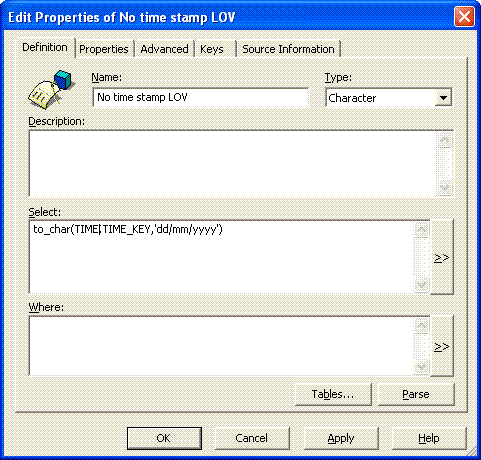
3.Now we will create an object that will be used inside the object's LOV,later on we re-map the lov of the date object to this object's LOV:


this object contain the function to_char in order to format the date object.

4.Inside the time key object properties we will re-map the LOV to the "No time stamp LOV " object and sort it from Z to A

 
5.Now we will get inside the object LOV and esit it's SQL to:

SELECT


to_char(TIME.TIME_KEY,'dd/mm/yyyy')
FROM
TIME
ORDER BY TIME.TIME_KEY


the result is :

 
make sure that you thick the "do not genertae" button  and the "export with universe" property of the LOV.

Sunday, August 14, 2011

Time difference calculations for call center - part 1

Here are two scripts that return the time difference between two dates in Oracle:

1.The following script returns the time portion in seperated columns :


SECOUNDS   MINUTES    HOURS    DAYS

     38              8            10           2569 


SELECT TO_CHAR(DATES.TIME_KEY, 'DD/MM/YYYY:HH24:MI:SS') AS TIME_KEY,

TO_CHAR(SYSDATE, 'DD/MM/YYYY:HH24:MI:SS') AS TODAY,
trunc(86400 * (SYSDATE - DATES.TIME_KEY)) -60 * (trunc((86400 * (SYSDATE - DATES.TIME_KEY) / 60))) AS SECOUNDS,trunc((86400 * (SYSDATE - DATES.TIME_KEY)) / 60) -60 *(trunc(((86400 * (SYSDATE - DATES.TIME_KEY)) / 60) / 60)) AS MINUTES,trunc(((86400 * (SYSDATE - DATES.TIME_KEY)) / 60) / 60) -24 *(trunc((((86400 * (SYSDATE - DATES.TIME_KEY)) / 60) / 60) / 24)) AS HOURS,trunc((((86400 * (SYSDATE - DATES.TIME_KEY)) / 60) / 60) / 24) AS DAYS

FROM DATES.TIME_KEY
 

2.The following script returns the time portion in hours,minutes and secounds in one column :

HOURS MINUTES SECOUNDS       
61 :    22 :    11
 
SELECT

TO_CHAR(DATES.TIME_KEY.TIME_KEY, 'DD/MM/YYYY:HH24:MI:SS') AS TIME_KEY,
TO_CHAR(SYSDATE, 'DD/MM/YYYY:HH24:MI:SS') AS TODAY,
(sysdate - nvl(DATES.TIME_KEY.TIME_KEY, sysdate)) * 24 as hour_diff,
floor((SYSDATE - DATES.TIME_KEY.TIME_KEY) * 24) ' : '
mod(floor((SYSDATE - DATES.TIME_KEY.TIME_KEY) * 24 * 60), 60)' : '
mod(floor((SYSDATE - DATES.TIME_KEY.TIME_KEY) * 24 * 60 * 60), 60)' ' time_difference

FROM DATES.TIME_KEY

These scripts can become universe objects and are good for call center calculation

SAP BusinessObjects BI 4.0 Platform Demo

 sneak preview demo of SAP BusinessObjects 4.0 new capabilities in Designer and Webi modules:

Dashboards in SAP BusinessObjects 4.0

Watch this demo of the new Xceslius called SAP Dashboard in version 4.0
 including some new great features like:
direct binding,embedded query designer,parameter selector component